
















Every day, thousands of documents pass through organizations: invoices, contracts, mail, HR files… Processing them manually costs time, generates errors, and ties up teams on tasks with no added value. Document AI changes that.
In brief
- Document AI reads, understands, classifies, and publishes your documents automatically, with no manual intervention.
- An AI assistant lets you query your archives in natural language, 24/7.
- Your data is automatically enriched and verified, and summary documents are generated on the fly.
- Benefits are measurable within the first weeks of deployment.
- No replacement of your existing document management system (DMS); sovereign hosting in France.
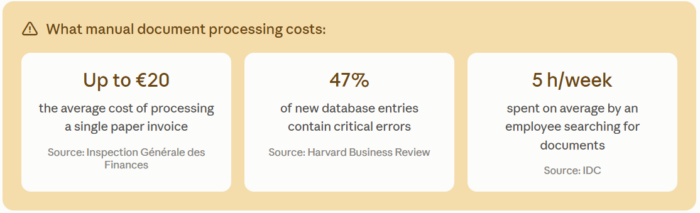
What manual document processing costs: processing a single paper invoice can cost up to €20 (Inspection Générale des Finances); 47% of newly created data records contain at least one critical error (Harvard Business Review); an employee spends an average of 5 hours a week searching for documents (IDC).
How does document AI process a document, from capture to publication?
Concretely, what happens between the moment a document arrives in your organization and the moment it becomes usable in the Elise DMS?
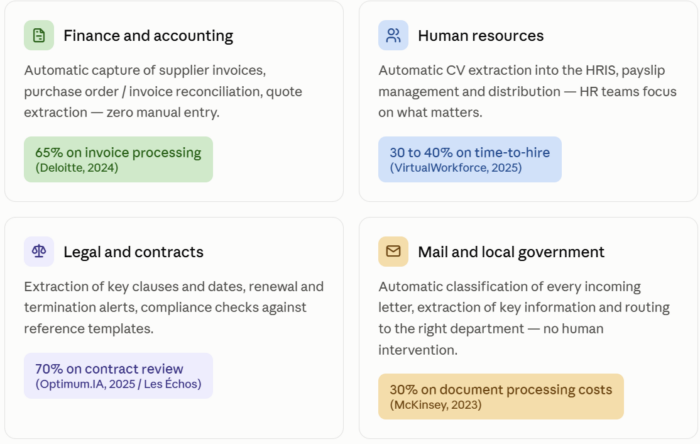
Developed by NeoLedge’s in-house research lab, AI.Lise is a suite of sovereign cognitive services that puts AI to work on your documents: six steps unfold automatically to fully automate, analyze, and transform them.
1. The document arrives, whatever its form
PDF, scan, fax, photo taken with a phone, paper or digital form… AI.Lise accepts everything, with no prior preparation needed on your part.
2. It is read in full
Printed as well as handwritten text, stamps, checkboxes, or complex tables are all understood. Signatures and images it contains (in an employment contract, for example) are also detected and extracted. All within seconds, even for a file of several dozen pages.
3. It is identified
AI.Lise recognizes what type of document it is (invoice, contract, HR letter…) and indicates this with a confidence level.
4. Its key information is extracted
References, dates, amounts, stakeholders… depending on the document type.
5. It is filed in the right place
Automatically, respecting your organization’s own folder structure in Elise. No coding required.
6. It is published in Elise
Reliably and quickly, with mechanisms that guarantee no document is ever lost or duplicated, even in the event of a technical incident.
All of this happens within seconds to a few minutes, depending on volume.
How does the AI read and understand your documents?
Recognizing characters isn’t enough: an AI must also understand what a document is, and what to do with it. At NeoLedge, AI.Lise meets both of these requirements on Elise documents, with no additional development required.
Content extraction
A multi-modal OCR handles printed text, handwriting, stamps, checkboxes, and complex tables alike. The result: a structured, usable output produced within seconds, regardless of the volume or quality of the original document.
Auto-classification
Rather than following rigid rules, AI.Lise relies on deep learning to recognize the nature of each document as soon as it’s received, with a displayed confidence score. Uncertain cases are submitted for human validation, and each validation makes the system more reliable.
Auto-indexing
Once identified, the document is automatically enriched. Title, reference, dates, contacts, regulatory retention period… everything is filled in without re-entry.
Agents running in parallel
This is one of the most useful, and least visible, aspects of AI.Lise’s work: while your document is being classified and published, agents run in parallel, without slowing down the process. Depending on the document type and your needs, this could be two, three, ten actions, or more. Here are a few of the most common examples:
- Data verification against official sources. A company identifier is checked against official registries (a SIRET or SIREN number checked against INSEE’s official databases in France, for example), a postal address is standardized and geolocated. You’re no longer working with simply entered data, but with confirmed data.
- Automatic generation of a deliverable. Depending on the document type, AI.Lise can produce a clear summary on the fly: the parties involved, key dates, amounts, clauses to watch. For an employment contract, for instance, a complete summary (salary, collective bargaining agreement, probation period, benefits) is generated directly, ready to be shared with HR, without anyone having had to write it.
Other agents can be added depending on your business processes: data enrichment, compliance checks, notifications to relevant teams, updates to other systems… Each organization can thus orchestrate as many parallel tasks as needed, all triggered by the arrival of a single document.
Once your documents are filed, how do you query them?
Automating capture and filing is one thing. But once your documents are in Elise, how do you use them effectively day to day? This is where AI.Lise’s conversational assistant comes in.
Your staff can ask it questions in natural language, just as they would a colleague:
- “What are the key dates in this contract?”
- “Summarize this 47-page file for me.”
- “Does this document comply with our procedure?”
The assistant scans through all relevant documents, across one or several folders, within seconds. Available 24/7, directly from the Elise interface. It can also:
- Automatically summarize a document or a multi-document file within seconds
- Cross-reference multiple sources to extract overall meaning and trends (e.g., for a mayor: “What’s happening in my city?”, an overview of citizen requests, ongoing projects, etc.)
- Instantly translate a document written in a foreign language
- Compare documents to identify discrepancies or anomalies (invoice/purchase order reconciliation)
- Generate content based on document information (summary, template reply, meeting minutes)
- Calculate figures based on data extracted from documents
- Flag key dates, deadlines, or contractual clauses to watch
And this intelligence doesn’t need to be triggered manually every time. Available via API, the assistant can be connected to Elise Automate, Elise’s automated workflow engine, to trigger these actions itself without human intervention. Your processes run continuously, in the background, automatically.
What gains can document AI deliver, department by department?
Here are the main uses of document AI by department, with the gains observed in published studies.
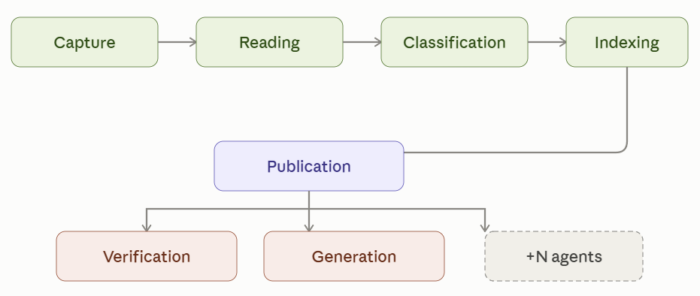
- Finance and accounting: automatic capture of supplier invoices, purchase order / invoice reconciliation, quote extraction, with zero manual entry. Up to 65% saved on invoice processing (Deloitte, 2024).
- Human resources: automatic CV extraction into the HRIS, payslip management and distribution, so HR teams can focus on what matters. 30 to 40% saved on time-to-hire (VirtualWorkforce, 2025).
- Legal and contracts: extraction of key clauses and dates, renewal and termination alerts, compliance checks against reference templates. Up to 70% saved on contract review (Optimum.IA, 2025 / Les Échos).
- Mail and local government: automatic classification of every incoming letter, extraction of key information and routing to the right department, with no human intervention. 30% saved on document processing costs (McKinsey, 2023).
And these gains aren’t limited to one particular sector: they’re found just as much in real estate, urban planning, healthcare, energy, agri-food, or transport… anywhere that a high volume of documents to process can slow down, or even stall, decision-making.
Do you need to replace your DMS to use document AI?
No. AI.Lise is fully integrated into Elise: it’s not a tool to be added, connected, or awkwardly made to coexist with your DMS. It’s a native capability of your platform.
Your teams keep working exactly as before, in the same interface; the AI simply operates in the background, without changing any of your habits.
Is document AI secure and GDPR-compliant?
Documents are processed and hosted exclusively in France, with end-to-end encryption of data both in transit and at rest. Access is strictly controlled and logged.
AI.Lise is available on a SecNumCloud-qualified sovereign cloud (ANSSI). Our solution is designed in line with the requirements of the European AI Act: AI-powered features are clearly identified in the interface, every process is fully traceable end-to-end, and a code of ethical conduct governs all our AI uses (usefulness, legality, reliability, and confidentiality).
Your data never passes through infrastructure outside our control.
Discover the full range of NeoLedge’s document AI services
Learn more about NeoLedge’s expertise and certifications
Frequently asked questions
What happens if the AI isn’t sure about its classification or extraction?
The document is automatically set aside for a staff member to decide, rather than risking a silent error. This occasional human validation also allows the system to gradually improve.
How long does it take to see the first results?
Gains are generally visible within the first weeks of use, without needing to wait through a lengthy calibration phase.
Can document AI handle unstructured documents, like a letter?
Yes. Unlike a form with fixed fields, a letter or email has no predictable structure: the information is embedded within continuous text. AI.Lise relies on deep learning and generative AI models capable of understanding the meaning of the text to extract useful information, even without standardized formatting.
What types of documents can be processed by document AI?
Practically all business documents: invoices and quotes, contracts and legal deeds, resumes and pay slips, mail, identity documents, bank statements, patient and administrative files… structured or unstructured.
Is document AI reserved for large companies?
No. The solution is designed to be operational quickly, without requiring specific technical expertise or a lengthy implementation project. SMEs and mid-sized companies handling large volumes of invoices, mail, or contracts often see a visible ROI within the first few weeks.